Showing posts with label sharepoint 2010. Show all posts

Monday, September 8, 2014

Sharepoint 2010 : How to deploy a solution (wsp)?

I got this solution from other blog and didn't save the URL.
Just want to put in my blog for my own benefit, i will forgot this easy steps cause i rarely do this.

How to to deploy Solution file (WSP) from Central Administration:

        1- Open you power shell using administrator id (run as administrator).
        2- Add WSP to your farm using the following command:
       stsadm -o addsolution -filename

       Ie:
       Stsadm –o addsolution –filename ThreadedComments.wsp

2-   From 'Central Administration', go to 'System Settings' > 'Manage Farm Solutions'
3-  Select your WSP file to deploy
4-  Click 'Deploy Solution'
5-  Configure your Deployment Settings.
6-  Click 'OK'. Your new feature will be deploy.
7-  You can now activate the new feature when you want to use it.


Thursday, June 6, 2013

Sharepoint 2010 : Adding chart

This web part must be download and install first to be use in Sharepoint 2010.
You can find the installer here:

http://www.amrein.com/apps/page.asp?Q=5749

And it is FREE!
If you are the administrator, you can download and install it by yourself. Otherwise, ask your web administrator instead :)

By the way, I have tried to use this feature.

If the feature has been installed in Sharepoint server, the feature will be in the web part list. So you just have to add the web part :)

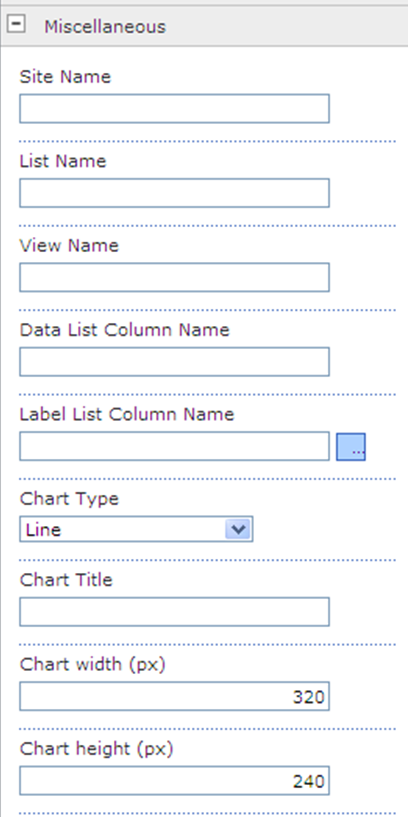
The chart can extract data from the existing list in your site, or you add a new list.

Configure the setting in Miscellanous part when you edit the web part. If you configure it correctly, the chart will be shown at the web part zone as example below:


chart.png


 Now you can have graphic on your site!

:)

Wednesday, April 17, 2013

Sharepoint 2010 : Securing Your Web Part

When to secure your web part?
Scenario:
Let say you have a page with some information; most of the information there is for public viewing. It’s just that a part of it is not meant for public. So instead of having 2 pages with 90% similar information, you can actually have 1 page with some confidential information – only for selected users.
What you have to do is create a separate web part for the confidential information and assign target audiences for the confidential information.

With this, information in this web part is secured and cannot be view by public.
As simple as that!

Wednesday, April 10, 2013

Documents icon did not showing up in search result - Sharepoint 2010

Picture is from Google :)

Some of my users complaint that they did not see the document icons in search result - after we installed the iFilter.
When we check, the source of the images is empty. (src=" ")
But it is weird because certain users can see the document icon perfectly.

After investigation, we found that there are double mapping key in xml file (docicon.xml).

<Mapping Key="pdf" Value="pdf16.png"/>
<Mapping Key="pdf" Value="pdf.gif" OpenControl=""/>

After removed one of the mapping key the search icons were displayed perfectly for all users. 

I am now happy :)


Monday, January 14, 2013

Error deleting Web Site ABC. You can't delete a site that has subsites.

Error deleting Web Site ABC. You can't delete a site that has subsites.

Encounter this when tried to delete a site. I thought that we can just simply delete a parent then the child will also been deleted.

Now I have to delete the subsites before terminating the parents :(

Bye!